Wednesday, December 6, 2017

Ripping Blu-ray for Viewing in HTC Vive VR

Virtual reality is here. It's really fascinating to immerse in a world by using a VR headset and motion tracking to let you sit around a virtual space as if you are actually there. It's all said, HTC Vive has intrigued the changes among the current wave of VR. Stunning graphics make it feel so real and surreal simultaneously. Once you put on the HTC Vive headset, what you want to do firstly? For me, it's definitely to watch movies, especially watch Blu-ray Games of Thrones season 6besides playing games. Is there any out-of-the-box solution for watching 2D/3D Blu-ray on HTC Vive? Well, follow this article, you will get the hand-on workflow by some effective tools here.


Part 1 How to covert Blu-ray to 3D movies for watching on HTC Vive VR?

Part 2 Guide to rip Blu-ray to HTC Vive VR for watching in a simple way

Part 3 What the VR players available for playing 3D videos on HTC Vive?

How to covert Blu-ray to 3D movies for watching on HTC Vive VR?

As far as I know, there is no native Blu-ray Disc drive in VR HTC Vive, so if you want to play Blu-ray on VR HTC Vive, the best way is to covert Blu-ray to MP4/MKV in 3D side-by-side or top-to-bottom by the help of a professional Blu-ray ripper, and Dimo Video Converter Ultimate for Mac is your best choice, it will save your waiting time when converting Blu-ray to 3D for HTC Vive within minutes by 6X fast-mode NVIDIA CUDA speed-up technology and its preset VR profile.With it, you can effortlessly convert any 2D/3D Blu-ray to HTC Vive VR supported format with no need of any parameter setting but keeping your Blu-ray round sound such as 7.1 stereo soundtrack and multiple subtitles.

Moreover, with its build-in editor, you could get more shining effects such as "Tint", "Emboss", "Invert" and "Vertigo" SFX effects to create a horror movies or make Christmas videos, including cropping frame size, trimming video, merging segments video and more. For Win users, please turn to Dimo Video Converter Ultimate, which shares the features with Mac version. Couldn't wait for viewing 2D/3D Blu-ray on HTC Vive? Then, go to download the right version and follow the workflow as below  to have better Blu-ray on your HTC Vive VR enjoyment.

Free Download Dimo Video Converter Ultimate for Mac/Win:

          
  
Guide to rip Blu-ray to HTC Vive VR for watching in a simple way

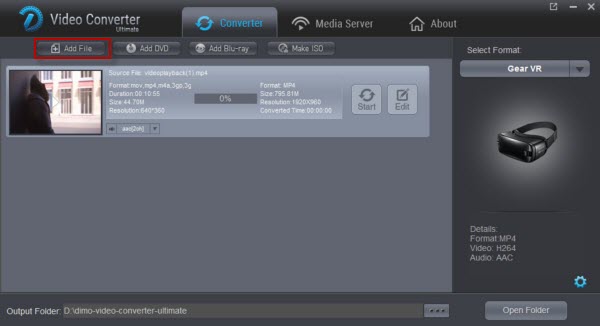
Step 1: Insert 2D/3D Blu-ray disc into your external BD driver, and launch the Blu-ray ripping software. After importing, click "Add Blu-ray" to load your movies.


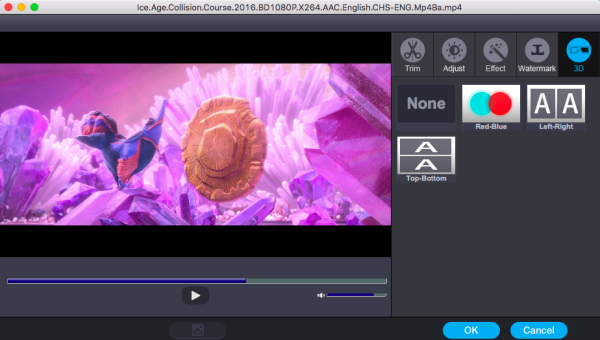
Step 2: Go to the "Select Format" bar and follow the path "Device" > "VR" > "HTC Vive" >"Edit" >"3D" > "Left-Right" or "Top-Bottom" > "OK".


Tip: If you like, you can click "Settings" to adjust the output video parameters including video encoder, resolution (Most VR resolution at present is 720P), bitrate, frame rate (the higher the better to avoid dizzy, and the highest framerate Dimo supported is 60 pfs).


Step 3. Hit the "Start" button; this Blu-ray Ripper for VR will start to convert Blu-ray to SBS 3D MP4 for HTC Vive VR. After conversion, connect the USB drive with computer and head to the destination folder where the converted files are stored (under "Open" button). After that, transfer them to HTC VR headset and play with 3D Video Player app. Now, just enjoy.

What the VR players available for playing 3D videos on HTC Vive?

If you don't like to watch 3D Blu-ray on HTC Vive VR, then you could go to the store and download Whirligig Player and Publisher for windows, both support the Vive, OSVR and any other devices that steamVR choose to support in the near future.

Still have trouble about ripping Blu-ray to 3D videos on HTC Vive VR? Please feel free to Contact Us.

Free Download or Purchase Dimo Video Converter Ultimate for Mac/Win:



Kindly Note:

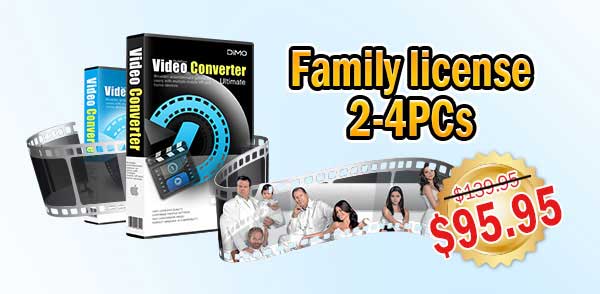
The price of Dimo Video Converter Ultimate for Mac is divided into 1 Year Subscription, Lifetime/Family/Business License: $43.95/Year; $45.95/lifetime license; $95.95/family license(2-4 Macs); $189.95/business pack(5-8 Macs). Get your needed one at purchase page.

Read More
Source: Get Blu-ray to play on HTC Vive with ease

Tuesday, September 19, 2017

Dimo provides 57% OFF special package offer at one year celebration

8K Player is a world class application and this has been proved by the fame it gained in the short span of a year. On the auspicious occasion of their first anniversary, DimoSoft has brought a golden giveaway offer and promotion campaign that is valid till the 26th of September, 2017. Only one week left!!! Don't miss! Read on to find out more.


Dimo provided their users with the opportunity to get the 8K Player and the Dimo Video Converter Ultimate as a package deal.

8K Player comes with features along the likes of:

* Incredible video and audio effect
* Lossless video quality
* Adjustment of volume option
* Fast-forward/ fast- backward options
* Blu-ray/DVD support
* Compatible with almost every video/audio format
* Free customer service
* Ultra HD experience

Special functions:

* Record and save options
* Screenshot options
* Loop video option
* Ability to check History
* Funny gif-making option
* Advanced Bookmark Function

They even added a few new options in the latest 3.5.1 version to cater to their audience:

* Began supporting Blu-ray/DVD Title mode to provide the user with the best experience.
* Fixed a few minor bugs.

Meanwhile, Dimo Video Converter Ultimate on the other hand, is a conversion program that allows for videos to be converted very easily to and from various formats such as from FLV to MKV, MKV to MP4, AVI to MP4, WMV to MOV amongst others. Various audio conversions are possible too. They may even be played on various different devices.

This huge deal they've designed contains an all-in-one Gift Pack consisting of 8K Player and Dimo Video Converter Ultimate (V3.5.1) altogether with 57% OFF.

The combination of all the features these applications dually provide are vast:

* Rip, copy, watch Blu-ray/DVD

* Convert, edit, play, download movies, share video, audio across many varied platforms

* Support various types of video conversion

* Along with technical support, 30-day guarantee, lifetime upgradation etc.

Moreover, while in normal circumstances, the price would've been $129.9, it is now $55.9! Save you $74!


Various flexible Dimo's products are also available at steep discounts. Check details on Dimo's official promotion page.

About Dimo Software, Inc.

Dimo Software (www.mediadimo.com). specializes in multimedia software to help more than 30 000 000 great users all over the world to have a much easier and better digital life!

By holding the aim to be the best multimedia software provider with a range of trusted and innovative desktop products of Windows and Mac, including Video Converter Ultimate, DVDmate, BDmate, 8K Player etc. series, to help you break out the cross-platform limitations among the digital entertainment equipments of Mac, Windows, iOS, Android, TVs, PSP/PS4, Xbox One X etc. with the great HD 2D/3D quality. And we keep pace on improving our performance and service system by rigorous testing process and promise to give you a wonderful visual and audio enjoyment than ever.

If you have any suggestions about our software performance on Windows and MacOS or need more coupon codes, please feel free to address our support team via Email Us or leave a message at Facebook.

Related Articles:

Wednesday, August 9, 2017

How to Easily Put iPhone 7 4K Videos on Premiere Pro

Before sharing your iPhone recordings on YouTube/Vimeo//Facebook/Instagram, you may want to edit iPhone videos in a video editing program. However, you may find it a painful experience to put iPhone videos to Premiere Pro. That's because the iPhone (including iPhone 7, iPhone 7 Plus, iPhone 6, iPhone 6 Plus, iPhone 5S, iPhone 5C, iPhone 4S, etc.) records and outputs its files as .MOV files. Files are compressed using the h.264 codec, which is not good for editing in Premiere Pro. This tutorial will quickly walk you through how to drag and drop iPhone 7 (4K) videos to Premiere Pro timeline for editing without hassle.


To work iPhone 7 (4K) videos in Premiere Pro smoothly, we need convert iPhone video to Adobe Premiere preferred MPEG-2 or H.264 files and then import the converted files to Premiere Pro for editing. Dimo Video Converter Ultimate for Mac is recommended here to help you encode all of your iPhone (4K) files to MPEG-2/H.264 for using in Premiere Pro CC/CS6/CS5.

It is an optimal video converter for iPhone (4K) recordings. With it, you can transcode iPhone 4K H.264 .MOV to MPEG-2 for editing with PPro on Mac directly without any rendering or codec problems. Plus, it also allows you to convert iPhone videos to DNxHD for Avid Media Composer, MPEG-2 for After Effects, ProRes for Final Cut Pro, Apple InterMediate Codec for iMovie/FCE, etc with best results. Download it and follow the tutorial below to convert iPhone (4K) files to Premiere Pro CC/CS6/CS5 effortlessly. 

Free Download Dimo Video Converter Ultimate for Mac/Win:


Other Download: 

Convert iPhone video clips to Premiere Pro for editing

Step 1: Add iPhone (4K) files

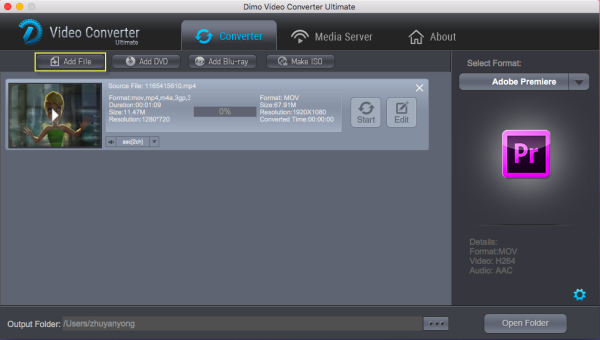
Install and launch the iPhone 4K Video Converter for Mac, and then click "Add File" button to import your 4K files to the software.


Step 2: Select output format

Click "Select Format" bar to determine output format. Follow "Editor" and select "Adobe Premiere" as the output format. Besides, you can also choose WMV if you want to get a relatively smaller output file.

Tips:

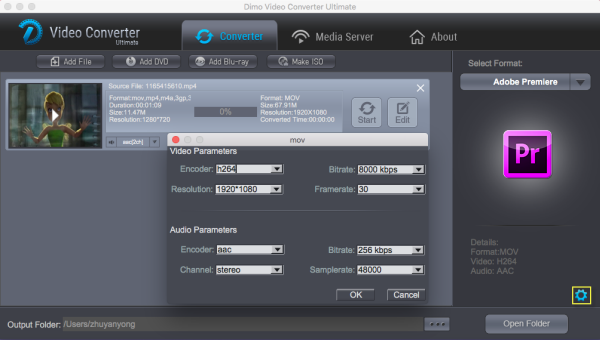
1. Settings- Click it to customize audio and video parameters Video Codec, bit rate, frame rate, Audio codec, sample rate, audio channels.


2. Editor - Click "Edit" to set add watermark, deinterlace, trim, crop, add effects, etc.

Step 3: Convert iPhone (4K) video to Adobe Premiere

Click "Start" button under the preview window, the converter will start encoding iPhone (4K) videos for importing to Adobe Premiere. Soon after the conversion is finished, just click "Open" button to get the converted iPhone 7 (4K) videos for edit in Adobe Premiere Pro CC/CS6/CS5 perfectly.

Free Download or Purchase Dimo Video Converter Ultimate for Mac/Win:

          

Kindly Note:

The price of Dimo Video Converter Ultimate for Mac is divided into 1 Year Subscription, Lifetime/Family/Business License: $43.95/Year; $45.95/lifetime license; $95.95/family license(2-4 Macs); $189.95/business pack(5-8 Macs). Get your needed one at purchase page.

Related Software:

BDmate (Mac/Win)

Lossless backup Blu-ray to MKV with all audio and subtitle tracks; Rip Blu-ray to multi-track MP4; Convert Blu-ray to almost all popular video/audio formats and devices; Copy Blu-ray to ISO/M2TS; Share digitized Blu-ray wirelessly.

DVDmate (Mac/Win)

A professional DVD ripping and editing tool with strong ability to remove DVD protection, transcode DVD to any video and audio format, and edit DVD to create personal movie.

Videomate (Mac/Win)

An all-around video converter software program that enables you to convert various video and audio files to formats that are supported by most multimedia devices.

8K Player (Mac/Win)

A mixture of free HD/4K video player, music player, Blu-ray/DVD player, video recorder and gif maker. 

Contact us or leave a message at Facebook if you have any issues.

Related Articles:

Source: How to Import iPhone 7 4K to Premiere Pro for Editing

Monday, July 24, 2017

How to open and play WMV on Mac OS High Sierra

There's a very common problem for Mac users- playing WMV files. When open WMV files by default in QuickTime on Mac, you'll commonly receive an error message along the lines of "This is not a movie file". The reason behind this it the fact that WMV files use Microsoft proprietary codecs that don't work in OS High Sierra. In this case, you will need a smart Mac WMV player or converter for MacOS High Sierra 10.13.


As we know, QuickTime and iTunes are perfect for playing movies and videos on Mac. However, WMV format is not supported by QuickTime or iTunes on MacOS High Sierra. Fortunately, with the help of Dimo Video Converter Ultimate for Mac, you can easily and quickly convert WMV to iTunes and QuickTime with the video quality preserved. It's built-in video player allows you to watch WMV and any other video on MacOS High Sierra without any hassles. 

Besides, this Mac video converter can also convert WMV to any other popular video format like M4V, MKVFLV, ASF, AVI, MPG, MTS, TS, etc. and audio files include MP3, M4A, AC3, AAC, WMA, WAV and MKA and much more. And it can download videos and audios from web sharing network such as Hulu, NicoVideo, FunnyOrDie, Facebook, YouTube, Google videos and others. For windows user, please turn to Dimo Video Converter Ultimate.

Free Download Dimo Video Converter Ultimate for Mac/Win:
          

Other Download: 

Convert WMV Files to MacOS High Sierra

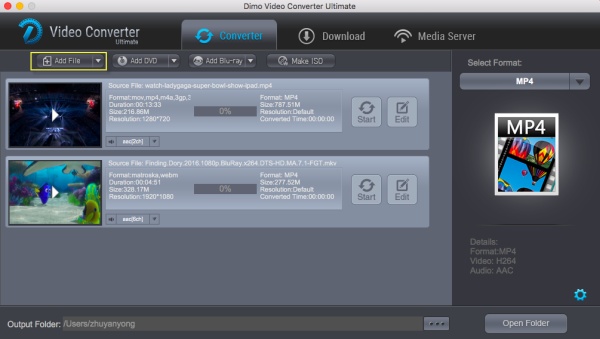
Step 1 Launch the program on your Mac. Click on the "Add File" button which is available on the bottom left side or drag and drop WMV files to this wmv to macos high sierra converter.


Step 2 After adding files in the software interface, select the output format MP4 or any other format from the 150 available formats.

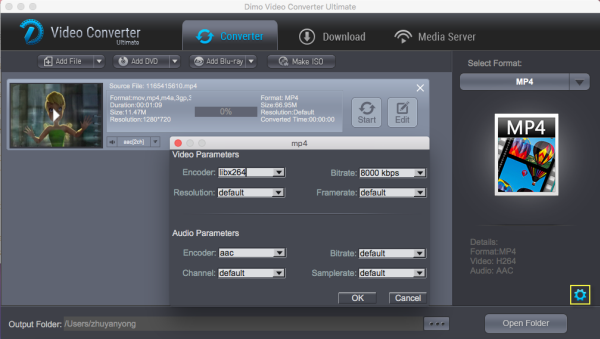
Note: You can click the "Setting" button to change code, bit rate, resolution, etc.


Step 3 Now click on "Start" to begin wmv to macos high sierra conversion. After converting wmv on macos 10.13, you will get converted files via "Open" and play WMV files on Mac OS Sierra with ease.

Free Download or Purchase Dimo Video Converter Ultimate for Mac/Win:


Kindly Note:

The price of Dimo Video Converter Ultimate for Mac is divided into 1 Year Subscription, Lifetime/Family/Business License: $43.95/Year; $45.95/lifetime license; $95.95/family license(2-4 Macs); $189.95/business pack(5-8 Macs). Get your needed one at purchase page.

Related Software:

BDmate (Mac/Win)

Lossless backup Blu-ray to MKV with all audio and subtitle tracks; Rip Blu-ray to multi-track MP4; Convert Blu-ray to almost all popular video/audio formats and devices; Copy Blu-ray to ISO/M2TS; Share digitized Blu-ray wirelessly.

DVDmate (Mac/Win)

A professional DVD ripping and editing tool with strong ability to remove DVD protection, transcode DVD to any video and audio format, and edit DVD to create personal movie.

Videomate (Mac/Win)

An all-around video converter software program that enables you to convert various video and audio files to formats that are supported by most multimedia devices.

8K Player (Mac/Win)

A mixture of free HD/4K video player, music player, Blu-ray/DVD player, video recorder and gif maker. 

Contact us or leave a message at Facebook if you have any issues.

Related Articles:
Source: How to convert WMV on Mac OS Sierra

Tuesday, July 18, 2017

Spider VR movie Download Free in HD 4K MP4 3GP FLV 3D

If you are fans of Spider-Man, you may known that it is the latest big-budget flick to get a VR tie-in want to get the touching and vivid experience that VR brings. So, what can we do to watch other Spider movies with the VR? If you want to get the touching and vivid experience that VR brings, you can read the following section in detail.


Here Dimo Video Converter Ultimate can help you finish the task. It is the professional VR videos downloader and converter software and support dwonloading VR trailer, 360 degree trailer, 3D VR videos movies and other 4K HD 1080p MP4,  MKV,  FLV , AVI MOV 3GP etc files from 300+ sites without any hassle.If you are Mac user, please turn to Dimo Video Converter Ultimate for Mac.

Free Download Dimo Video Converter Ultimate (Win/Mac):


Other Download: 

How to download Spider movie (VR trailer) 

Step 1: Launch the Spider VR movie downloader, copy and paste the link of it to the address bar of the program and then click "+" button.


Step 2: After downloading the video, click the "Convert" to select the VR format form "Format > VR" that you need. Then click the "Edit" tap to add 3D effect to your source movies before converting movies.


Step 3: Hit the "Start" button to convert the Spider VR movie, and you can watch Spider movie with VR headsets freely.

Tips: You can also transfer Spider movies to Android/iPad/iPhone, etc. for offline watching anytime and anywhere you want.

Free Download or Purchase Dimo Video Converter Ultimate:


Kindly Note:

The price of Dimo Video Converter Ultimate for Windows is divided into 1 Year Subscription, Lifetime/Family/Business License: $43.95/Year; $45.95/lifetime license; $95.95/family license(2-4 PCs); $189.95/business pack(5-8 PCs). Get your needed one at purchase page.

Related Software:

BDmate (Win/Mac)

Lossless backup Blu-ray to MKV with all audio and subtitle tracks; Rip Blu-ray to multi-track MP4; ConvertBlu-ray to almost all popular video/audio formats and devices; Copy Blu-ray to ISO/M2TS; Share digitized Blu-ray wirelessly.

DVDmate (Win/Mac)

A professional DVD ripping and editing tool with strong ability to remove DVD protection, transcode DVD to any video and audio format, and edit DVD to create personal movie.

Videomate (Win/Mac)

An all-around video converter software program that enables you to convert various video and audio files to formats that are supported by most multimedia devices.

8K Player (Win/Mac)

A mixture of free HD/4K video player, music player, Blu-ray/DVD player, video recorder and gif maker. 

Contact us or leave a message at Facebook if you have any issues.

Related Articles:
Source: Download Spider movie (VR trailer) to watch

Wednesday, July 12, 2017

Fast DVD Ripping of South Park all Episode from Season 1-20

South Park is a story about the curious, adventure-seeking, fourth grade group of boys, Stan, Kyle, Cartman, and Kenny, all join in in buffoonish adventures that sometimes evolve nothing. Sometimes something that was simple at the start, turns out to get out of control. Everything is odd in the small mountain town, South Park, and the boys always find something to do with it. If you child love the cartoon, you maybe buy South Park DVD. But, how to rip DVD South Park seasons 1- 20 on Windows PC/Mac? The artlcile will show your answer.


The first and best DVD ripper we recommend here for your South Park DVD ripping is Dimo Video Converter Ultimate, which ranks first for its ultra-fast DVD ripping speed and amazing high output quality. It is as easy as winking to rip your DVD South Park to iPhone 7 (Plus)/6S (Plus)/SE, iPad Air 2/Mini 4/Pro, Samsung Galaxy S8/S8+/Note 5, HTC One M9, Google Nexus, Microsoft WP8, Surface etc. with this professional TV shows DVD ripper. And your intention of remaining original video/audio quality will be perfectly realized. You can batch covert The South Park DVD full episodes, like season 20, to AVIMP4FLV, MPEG, WMV, MP3, etc for personal enjoyment on PC or gadgets, or sharing funny highlights on social media. For Mac user, please turn to Dimo Video Converter Ultimate for Mac. Next is South Park DVD ripping steps (for your reference).

Free Download Dimo Video Converter Ultimate (Win/Mac):


Other Download: 

How to Rip South Park DVD all TV series on Windows PC/Mac

Step 1: Click on "Add DVD" to import your inserted South Park DVD to the program for converting.


Step 2: Select any format that you need from as output format.


Step 3. Hit the "Start" button to convert your South Park DVD. Please wait for a few minutes, and you will get it.

Tip: You can rip DVD with Multi Track and rip DVD to Video_ts folder too. Besides, you can get your local files including Blu-ray and DVD converted and shared on your mobile devices or TV without anything loss for better view experience.

Free Download or Purchase Dimo Video Converter Ultimate:


Kindly Note:

The price of Dimo Video Converter Ultimate for Windows is divided into 1 Year Subscription, Lifetime/Family/Business License: $43.95/Year; $45.95/lifetime license; $95.95/family license(2-4 PCs); $189.95/business pack(5-8 PCs). Get your needed one at purchase page.

Related Software:

BDmate (Win/Mac)

Lossless backup Blu-ray to MKV with all audio and subtitle tracks; Rip Blu-ray to multi-track MP4; ConvertBlu-ray to almost all popular video/audio formats and devices; Copy Blu-ray to ISO/M2TS; Share digitized Blu-ray wirelessly.

DVDmate (Win/Mac)

A professional DVD ripping and editing tool with strong ability to remove DVD protection, transcode DVD to any video and audio format, and edit DVD to create personal movie.

Videomate (Win/Mac)

An all-around video converter software program that enables you to convert various video and audio files to formats that are supported by most multimedia devices.

8K Player (Win/Mac)

A mixture of free HD/4K video player, music player, Blu-ray/DVD player, video recorder and gif maker. 

Contact us or leave a message at Facebook if you have any issues.

Related Articles:

Source: Rip South Park DVD TV series on Windows PC/Mac

Wednesday, July 5, 2017

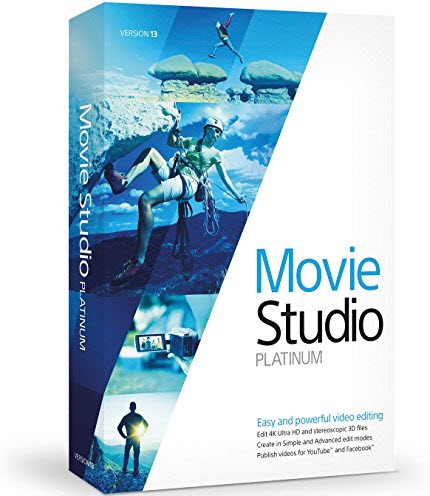
Make FLV compatible with Vegas Movie Studio (14) Platinum

Featuring light weight and small size, FLV is popular video formats used to deliver videos mostly over the Internet using Adobe Flash Player, including Google video, Yahoo video, YouTube and more. But, Sony movie studio is one other application that does not accept videos in FLV format. Although it may sometimes be a major setback to you as a user when trying to edit a video in FLV format using this application, ways have already been established to circumvent this problem. One way is to convert the video format from FLV to any other format type that is acceptable by Sony movie studio.


To finish the task, Dimo Video Converter Ultimate is highly recommended. With it, you can easily convert any video files including FLV, VOB, MP4, MTS, AVI, MKV, MOV, and more to MPEG-2 encoded MPG files, which ensure the best results when working with Sony Movie Studio. 

In addition, this video converter can also help you convert video to seamlessly fit Sony Vegas, Avid Media Composer, Adobe Premiere, Pinnacle Studio, Windows Movie MakerFCP, etc. If you are Mac user, please turn toDimo Video Converter Ultimate for Mac.

Free Download Dimo Video Converter Ultimate (Win/Mac):


Other Download: 

How to Get FLV work with Sony Movie Studio 13/12/11/10

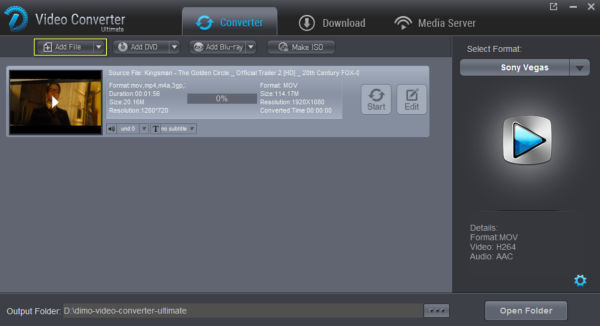
Step 1: Click on "Add File" to import your FLV files. Alternatively, you can directly drag and drop your FLV videos to the program.


Step 2: Select "Song Vegas" from the "Editor" as output format.


Step 3. Hit the "Start" button to convert your video file. Please wait for a few minutes, and you will get converted files for importing into Sony Movie Studio.

Free Download or Purchase Dimo Video Converter Ultimate:


Kindly Note:

The price of Dimo Video Converter Ultimate for Windows is divided into 1 Year Subscription, Lifetime/Family/Business License: $43.95/Year; $45.95/lifetime license; $95.95/family license(2-4 PCs); $189.95/business pack(5-8 PCs). Get your needed one at purchase page.

Related Software:

BDmate (Win/Mac)

Lossless backup Blu-ray to MKV with all audio and subtitle tracks; Rip Blu-ray to multi-track MP4; ConvertBlu-ray to almost all popular video/audio formats and devices; Copy Blu-ray to ISO/M2TS; Share digitized Blu-ray wirelessly.

DVDmate (Win/Mac)

A professional DVD ripping and editing tool with strong ability to remove DVD protection, transcode DVD to any video and audio format, and edit DVD to create personal movie.

Videomate (Win/Mac)

An all-around video converter software program that enables you to convert various video and audio files to formats that are supported by most multimedia devices.

8K Player (Win/Mac)

A mixture of free HD/4K video player, music player, Blu-ray/DVD player, video recorder and gif maker. 

Contact us or leave a message at Facebook if you have any issues.

Related Articles:

Source: Get FLV work with Sony Movie Studio 13/12/11/10